How to Track Your Spending in New Zealand
A practical guide to understanding where your household money is going, identifying spending patterns, and taking control of your budget.
Try MyFinance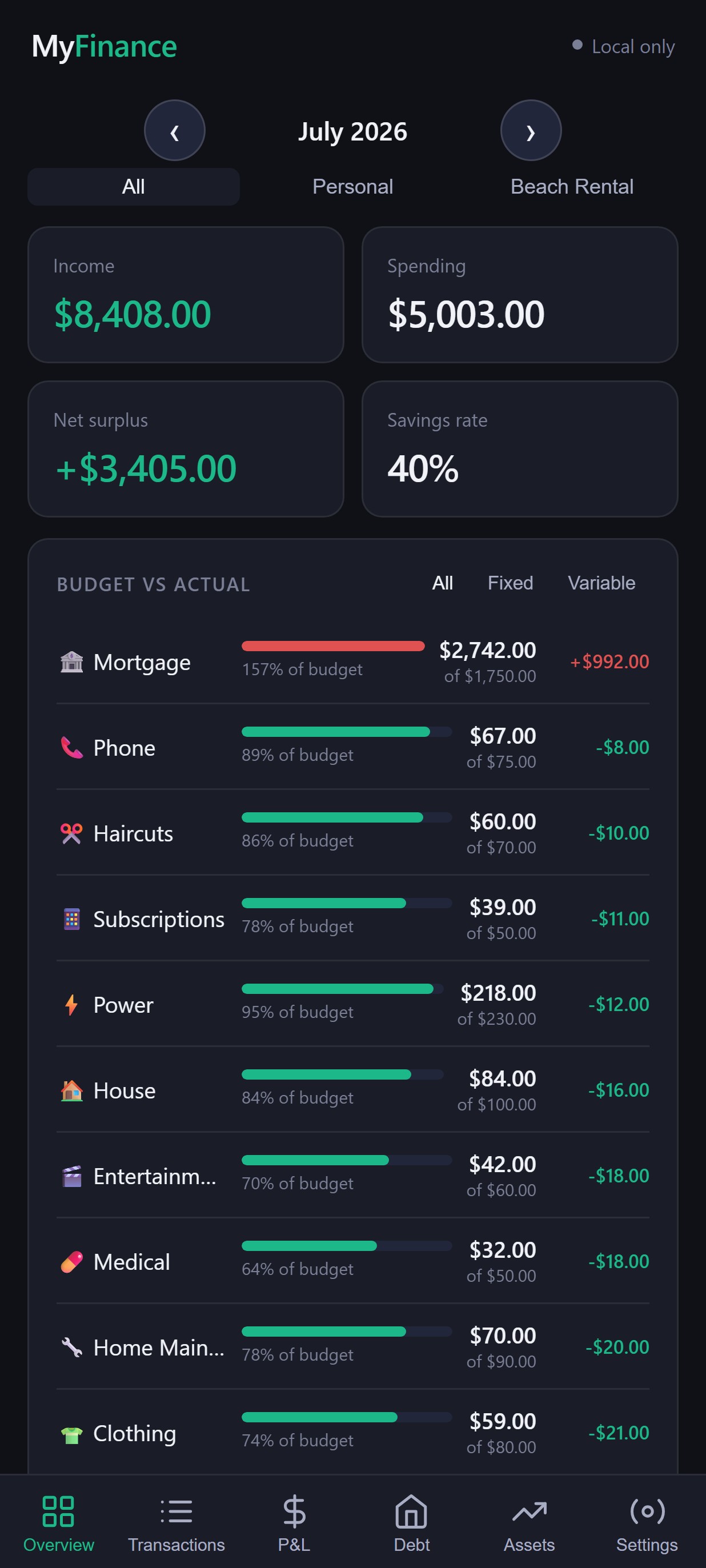
Why tracking your spending matters
Knowing your income and your fixed bills — rent or mortgage, power, insurance — only tells part of the story. Everyday spending adds up quietly across groceries, fuel, subscriptions, takeaways, and one-off purchases, and it's easy to underestimate how much of it there actually is.
Tracking spending doesn't change your finances by itself, but it gives you actual information to work with, instead of a rough guess. Once you can see where money is going, you're in a position to make decisions about it.
Ways to track your spending
There's no single correct method — each of these works for different people, depending on how much manual effort you're willing to put in.
Pen and paper
Write down what you spend as you go.
Spreadsheet
Log or paste transactions into your own spreadsheet.
Bank statements
Review statements directly through internet banking.
Budgeting apps
Use an app designed to organise and categorise spending.
Exporting to CSV
Export transactions from internet banking as a file, then review or import them.
The simplest process
Whichever method you choose, the underlying process tends to look like this.
- Collect your transaction history.
- Review the transactions.
- Categorise spending.
- Look for patterns.
- Compare spending with your budget.
- Decide what to change.
- Repeat regularly.
Using your bank's CSV export
A CSV file — short for comma-separated values — is just a simple text file, usually with one row per transaction: a date, a description, and an amount. Many people can export their transaction history from internet banking as a CSV file, then use it to review or analyse spending without any other tool needing access to their bank account.
Export steps vary by bank, and this guide isn't going to guess at menu names or file formats for any specific NZ bank — that's better covered in a dedicated guide for each bank. In general, look for an "export" or "download transactions" option within internet banking.
Tracking household spending
Individual spending is useful to see, but for most households the more useful picture is spending as a whole. Common categories include:
These are just a starting point — categories can and should be customised to fit how your own household actually spends.
What should you look for?
Once spending is categorised, a few patterns are usually worth paying attention to:
- Categories consuming more than expected
- Recurring subscriptions, especially ones you'd forgotten about
- Frequent small purchases that add up over a month
- Large, irregular expenses that skew a single month's total
- Spending that varies significantly from month to month
- The difference between what you planned to spend and what you actually spent
From tracking to budgeting
Tracking tells you what already happened — where the money actually went last month. Budgeting is different: it's about deciding what you want to happen next, using what tracking showed you to set realistic limits by category.
This is where a tool that combines both becomes useful. Our budget app for NZ households is built around exactly this — importing and categorising spending, then turning it into budgets you can actually track against.
How MyFinance works
MyFinance covers the whole process above, in one place — without ever connecting directly to your bank.
Import via CSV
Import transactions exported from your bank.
Categorise
Transactions are categorised automatically, based on rules you can edit.
View spending
See spending broken down by category, month by month.
Budgets
Set a budget per category and track actual vs budget.
Savings
See how much you're keeping back once spending is accounted for.
Debt
Track mortgages and other debts, including payoff progress.
Investments
Track KiwiSaver, shares, ETFs, property and more.
Net worth
Property, savings, investments and debt combined into one number.
A simple monthly routine
A short, repeatable checklist tends to work better than an occasional big effort.
- Import or review the month's transactions.
- Categorise anything new.
- Review spending by category.
- Compare actual spending against budget.
- Check for any upcoming expenses.
- Adjust next month's budget if needed.
- Review savings and debt progress.
Frequently asked questions
What is the easiest way to track spending?
For most people, exporting a CSV of transactions from online banking and reviewing it in a spreadsheet or budgeting app is the least manual approach, since the transactions are already recorded — you're organising them, not re-entering them by hand.
How often should I track my spending?
Monthly is a common starting point, matching how most bills and pay cycles work. Some people prefer weekly for tighter control. There's no single correct frequency — pick one you can realistically keep up with.
Should I track every purchase?
Tracking every transaction that appears on a bank statement is usually enough. You don't need to log cash purchases separately unless cash is a significant part of your spending.
Can I track spending without connecting my bank?
Yes. Exporting a CSV file from your bank's internet banking and importing or reviewing it yourself doesn't require giving any app or service your online banking login.
What is a CSV bank statement?
CSV stands for comma-separated values — a simple text file format, usually with a date, description and amount for each transaction. Most NZ banks let you export your transaction history as a CSV from internet banking.
What's the difference between a spending tracker and a budget?
Tracking shows you what already happened — where money actually went. Budgeting is about deciding what you want to happen going forward, using what you learned from tracking to set realistic limits.
Is a spreadsheet or a budgeting app better?
Neither is universally better — it depends on how much manual setup you're willing to do. A spreadsheet gives full control but needs your own formulas and categories; a budgeting app does more of that automatically.
Ready to see where your money is going?
Try MyFinance free — import your transactions and start tracking spending, budgets and net worth today.