Budget App NZ for Simple Household Budgeting
MyFinance is a straightforward budget app NZ households can use to track spending, budgets, savings, debt, investments and net worth — all in one place. Import your transactions instead of connecting your bank account.
Why use a budget app?
When household spending is spread across an everyday account, a credit card, and the odd cash purchase, it's genuinely hard to know where the money actually goes. Bank statements show individual transactions, but not the bigger picture — how much you're really spending on groceries, on bills like power and rates, or on the mortgage, month to month.
A budgeting tool pulls that spending into one place and groups it into categories you actually recognise, so you can see patterns, spot where a budget is slipping, and make decisions with real numbers instead of a rough guess.
What MyFinance can help you track
A household budget app should cover more than just this month's spending.
Spending
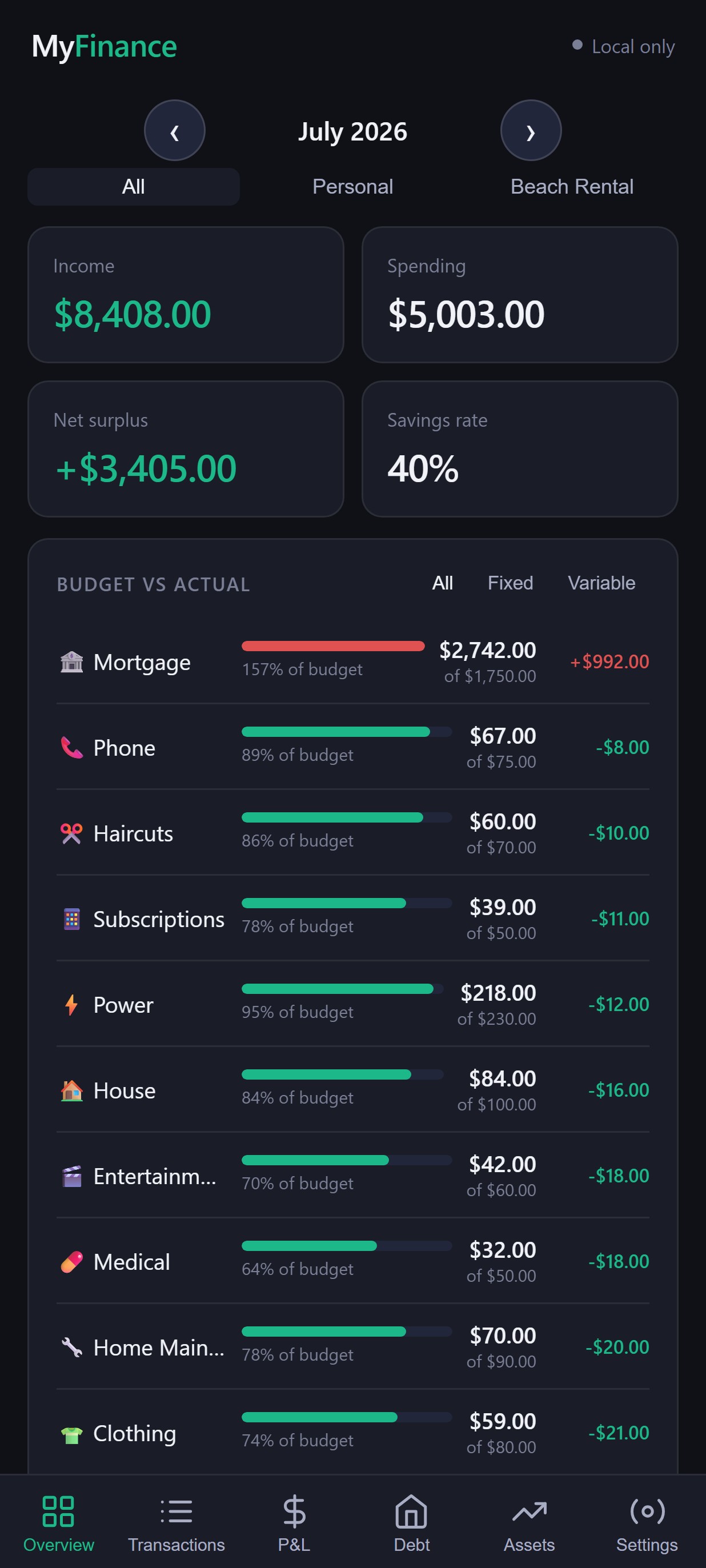
See where your money goes each month, broken down by category.
Budgets
Set a monthly budget per category and track actual spend against it.
Savings goals
Set savings goals and see how much you're keeping back once spending and bills are accounted for.
Debt
Track mortgages and other debts, including payoff progress over time.
Investments
Track KiwiSaver, shares, ETFs, property and more.
Net worth
Property, savings, investments and debt combined into one number.
Household finances Pro
Invite a partner to share the same household's data and budgets.
How the CSV approach works
MyFinance doesn't ask for your online banking login or connect directly to your bank account. Instead, you choose when to bring your transactions in.
Because you control the CSV, you decide exactly what gets shared with MyFinance and when — nothing syncs automatically from your bank in the background.
Designed for New Zealand households
MyFinance is built around how New Zealand households actually manage money — figures are shown in NZD, and CSV exports from ANZ, ASB, BNZ and Westpac are recognised automatically, with a generic importer available for other banks.
Who is MyFinance for?
Individuals
Anyone who wants a clearer picture of their own spending.
Couples
People managing money together, day to day.
Families
Households wanting to understand where shared spending goes.
Privacy-conscious users
Anyone who'd rather not connect their bank account to a budgeting app.
How it compares to a spreadsheet
A spreadsheet can absolutely work for household budgeting — plenty of people track their finances this way. But it usually means building your own categories, writing your own formulas, and manually re-entering transactions each month to keep it up to date.
MyFinance is built specifically around personal and household finance tracking: importing a CSV, categorising transactions, and seeing budgets, debt, investments and net worth without setting any of that up yourself. It won't suit everyone, but if maintaining a spreadsheet has become a chore, it's a more purpose-built alternative.
Try MyFinance
No bank connection required — and you can try it without creating an account.
Frequently asked questions
What is a budget app?
A budget app is a tool that helps you record and organise your income and spending so you can see where your money goes each month, set spending limits by category, and track progress toward savings or debt goals.
Is MyFinance available in New Zealand?
Yes. MyFinance is built for New Zealand households — figures are shown in NZD, and CSV imports from ANZ, ASB, BNZ and Westpac are recognised automatically, with a generic CSV importer for other banks.
Do I need to connect my bank account?
No. MyFinance never asks for your online banking login and never connects directly to your bank. You export a transaction CSV from your own internet banking and import it into MyFinance yourself.
Can I import bank transactions?
Yes. Export a CSV from your bank's internet banking and import it into MyFinance. ANZ, ASB, BNZ and Westpac formats are recognised automatically, and a generic importer covers other banks that export a date, description and amount.
What can I track with MyFinance?
MyFinance covers everyday spending, category budgets, recurring payments, savings, debt and mortgages, investments, and overall net worth — all in one place.
Is MyFinance suitable for household budgeting?
Yes. You can track personal and household spending in one account, and Pro accounts can invite another household member, such as a partner, to share the same data.
How do I get started, and what does it cost?
You can start using MyFinance straight away without creating an account. Core budgeting features are free — see our pricing page for full details on the free and Pro plans.